




 Indietro
















After dealing with the COVID global pandemic for the past year, it should be no surprise to anyone that working from home can be challenging. These various challenges include distractions, demands, lack of equipment (home wireless was never meant to be loaded the way it is now), and of course: bandwidth challenges.
To some users, the challenge with bandwidth might not be obvious, although it’s safe to say everyone can blame their internet connection for any number of things. According to tests conducted by the website Thrillist.com in May 2020, the average internet bandwidth to residential households in the US is 59.5 Mbps, varying state by state. The highest was Maryland at 84.1 Mbps, with the slowest being Alaska, clocking in at a paltry 20.6 Mbps. The average video conference call consumes 400-500 kb of data though, and if you’re doing HD video at 1.2-1.5 Mbps, throw in latency, issues with the ISP and conferencing service being bogged down by oversubscription, and everyone else in the house streaming something over the internet, bandwidth begins to become a problem quickly.
Consider all of that, then throw in virtual private network (VPN) connections. More specifically, full VPN tunnels, where all traffic is getting sent over the VPN tunnel to the company’s data center, regardless of its final destination. This is where things get really messy.
The problems with split tunneling
Most, if not all organizations have at some point in time chosen to secure their employee’s connectivity to company resources via a VPN. At first, a VPN was a secure connection to access local resources located in the company network: email servers, file shares, local intranets, etc. As ISP connections began to get saturated, directly correlating to more and more internet usage, network architects began to “break out” internet traffic, freeing up bandwidth and hardware resources, and creating a “split tunnel,” tunneling internal resources over the VPN connection and allowing other things to go outside the tunnel direct to the internet. This worked for a while; after all, all of the data and resources that employees accessed resided in the company data centers, most of those in close physical proximity to the VPN concentrators.
Companies used split tunnels because bandwidth simply was as accessible, plentiful, and cheap. They had to break out any traffic they could to try and prevent saturation of links, especially as more and more active content sprung up on the internet. The problems might be obvious: the user is exposed to all the wiles of bad actors using the Internet, and then, if infected/compromised, the bad actor could ride that tunnel back to HQ straight into your enterprise network. There’s nothing quite like a victim-provided secure transport to the goods, all while impersonating the owner of the machine they’re connecting from! In this diagram, we’re looking at what a typical split tunnel connection looks like:
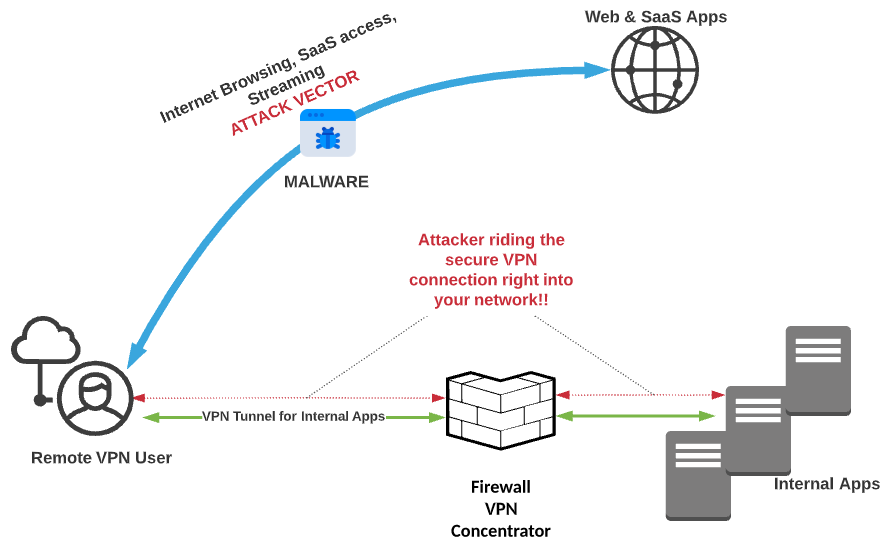
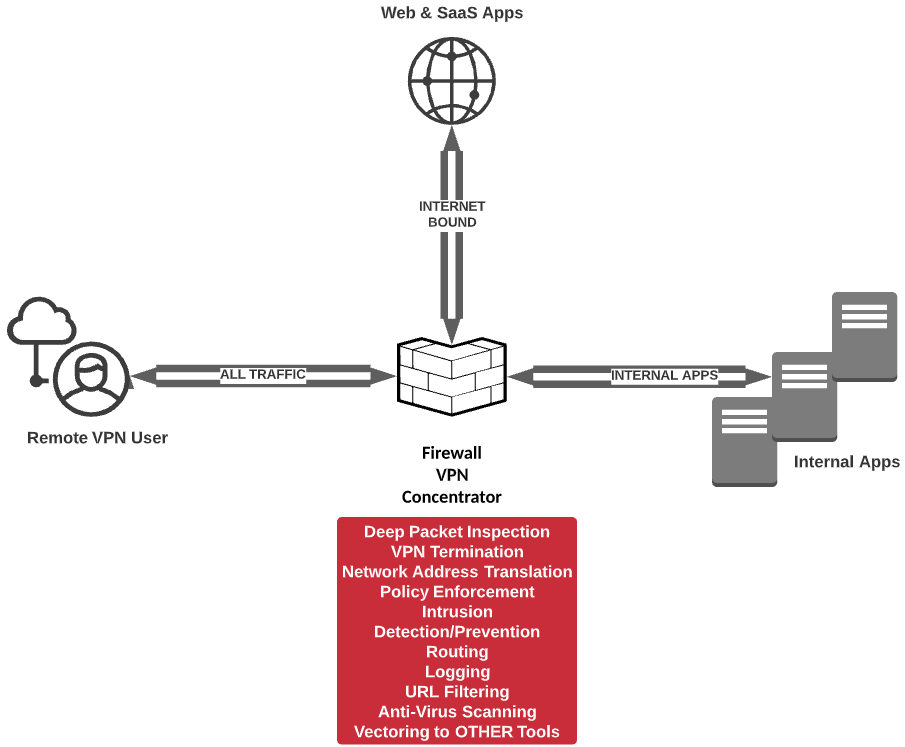
However, over the past decade, split tunneling has fallen out of favor among companies, and for good reason: the internet can be a bad place, full of bad actors, bad content, and bad intentions. Criminals are constantly trying to steal data using any means they can, and on top of that, the use of cloud services has grown exponentially, leaving security admins blind to, at times, the majority of their traffic. To try and gain visibility into that traffic, organizations once again began deploying full VPN Tunnels that included Internet-bound traffic. The primary driver was that it allowed network security teams to apply their on-premise security stack to remote user traffic. Basically, it was as if you were onsite at work, but without the 10 GB+ switching backplane and the multiple gigs of Internet bandwidth.
The below diagram captures exactly what we’re talking about:
Solving modern bandwidth problems
Fast forward to now, as odd a time as this is, and the world has changed yet again when it comes to getting business done. BYOD and cloud usage are at all-time highs and continue to grow. While bandwidth remains relatively cheap and available, the usage of said bandwidth continues to climb, driven by everything from more ubiquitous use to richer, more dynamic content at every turn. The providers are getting strained more than ever now, and what’s more, the hardware that terminates the full tunnel VPN connections, oftentimes firewalls that are doing several other very important tasks for the local network (that big red box in the diagram above), doesn’t dynamically scale and has to be constantly upgraded, maintained, and scaled horizontally (more appliances are added to increase resources) when the vertical upgrades no longer get the job done. This causes outages, required maintenance windows, and poor user experience, not to mention additional complexity with every concentrator/firewall added (whether on-prem or in the cloud!)
If that’s not enough, some SaaS providers are requiring or recommending that traffic go directly to them, as opposed to hairpinning back to a data center first. Don’t just take my word for it; several SaaS and VPN vendors have articles out there about how to exempt specific traffic (and at times, all internet-destined traffic) from a VPN tunnel and more, with some even providing recommendations during COVID-19 for how to use split-tunneling for accessing SaaS applications without hairpinning, etc.
Let’s say that Customer A decides to go with Netskope as the basis of a SASE architecture for securing all web traffic and cloud apps. Netskope is designed to eliminate the need for backhauling or hairpinning any web traffic over a VPN tunnel. The Netskope Security Cloud, powered by Netskope Cloud XD, combines all of the security features one would want in the best of on-premise security stacks: CASB, DLP, threat scanning, URL filtering and much more. Despite that, Customer A has decided to keep a full tunnel because they believe that a) there will be negligible performance impact, and b) they really want to continue using their on-premise security stack. When they roll out Netskope client to their roaming devices, they end up with suboptimal connection flow as shown below:
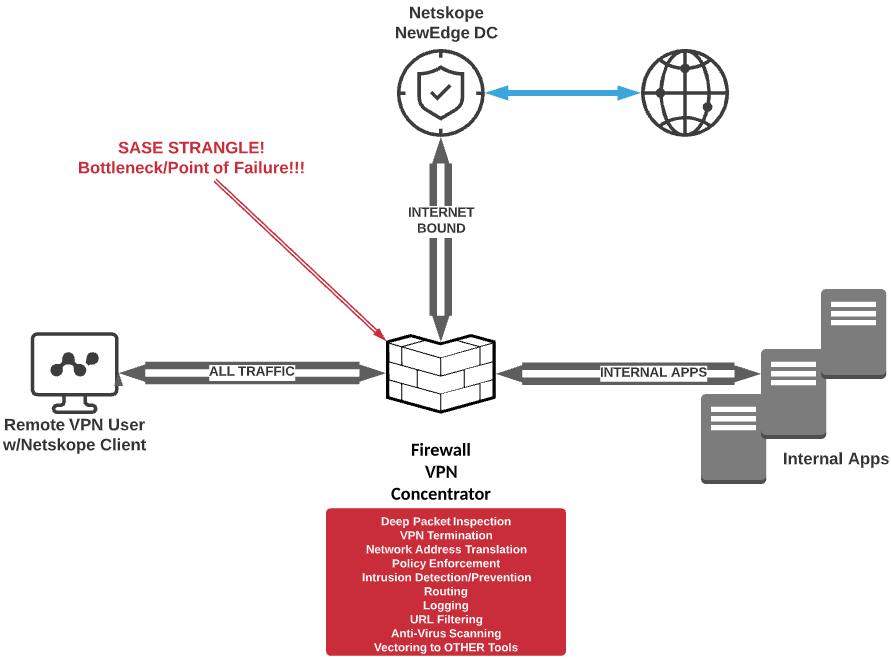
Three things happen in the scenario described, as pictured above:
- That incredibly efficient Netskope steering client is now steering traffic based on the closest NewEdge data center to the firewall, not the remote user; performance degradation will occur.
- The firewall has not been relieved at all, and the same precious firewall resources continue to be consumed, threatening horizontal upgrades and additional complexity.
- Bandwidth is being consumed at a tremendous rate as all traffic routes through the pipes the organization is paying for rather than using the internet bandwidth that’s local to the user.
Conclusion
Don’t strangle your SASE! Upon choosing Netskope, trust that web traffic and SaaS applications will be visible and secured and that NewEdge architecture will provide the best experience possible. All traffic from the Netskope Client can escape the tunnel and go directly to the closest Netskope NewEdge data center, and realize all the advantages that SASE promises to provide! Here’s a visual:
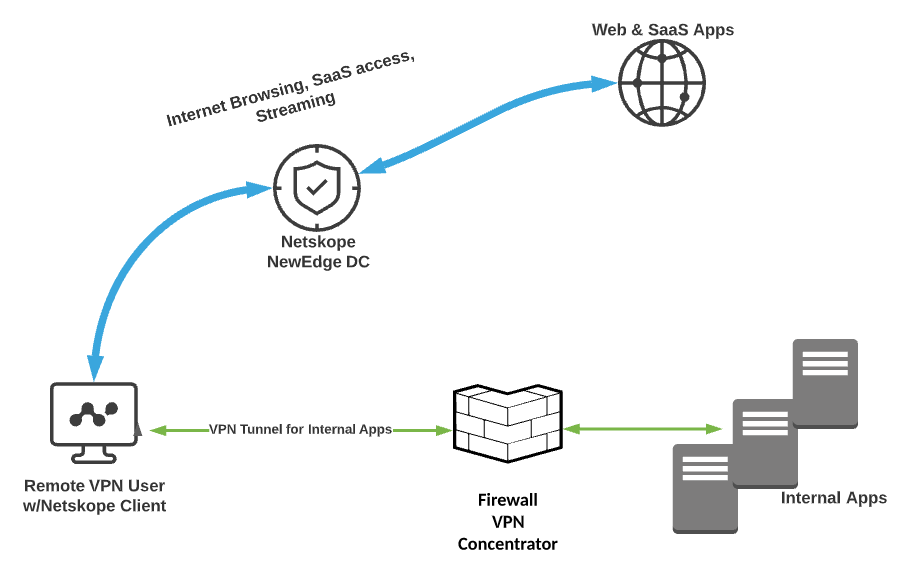
Now, instead of letting that internet-destined traffic (represented by a MUCH thicker volume line!) brave the wild west and counting on your EPP/EDR to weed out whatever may hit the host, or backhauling all of that traffic via full tunnel VPN connections, you can feel secure in knowing your internet-bound traffic is being sent to a policy enforcement point in the cloud, instead of traversing the tunnel. This ensures:
- Corporate policy from a usage perspective is enforced
- Multi-level threat scanning is done on web-sourced/destined traffic
- Application visibility and granular controls are applied
- DLP policy is applied to all things sent to and from the Internet
- Internal applications are still accessible via the VPN (there’s a better way for this, too, check out these articles!)
All while saving bandwidth, reducing complexity, opening fewer holes in your perimeter and network, and providing the best user experience based on location, Netskope peering, and optimizations!
For more information on configuring your VPN clients to work best with Netskope NewEdge network, current customers can check out this article on the Netskope support site.


 Leggi il blog